Sunday means a late breakfast, some straightening-up around the house and a plan – that didn’t work out – to do some prep cooking for the week. Instead of cooking, I sat down with my iPhone 18 Pro Max to read some stacked-up news articles from the week. And that’s where our story begins and ends.
Incident 1
I received an iPhone 18 Pro Max review unit from Apple, and promptly set it up as my daily driver. Trouble was, I just couldn’t work with a phone that large for hours at a time. So I switched back to my trusty iPhone 16 Pro.
I use the Pro Max a lot – for watching videos, and for reading, because it’s so big. And sometimes I absent-mindedly open up the Mail app, because that’s what you do when you’re playing on your phone. Well, as it happened, I’d only configured one of my several mail accounts on this phone. So each time I open Mail, I get an alert that tells me I need to enter a password. But one of the two buttons in the dialog, and the one that started this whole project, is unreadable.
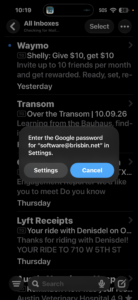
My zoom-way-in-and-squint technique (VoiceOver would work, too) tells me it says Cancel. And I’m very sad to remind you that this is not a wayward third-party app; it’s Mail on the iPhone. Someone told me it’s a white button on a blue background. Don’t do that.t.
